
200,000 ITEMS LATER,
YOUR INVENTORYIS THE FINAL BOSS.
Demos, duplicates, landmarks, old body sizes, mystery folders and everything else you swore you’d sort later.
Search the way you remember it. Build a review list from the clutter you don’t need. Then let Cache Compass move the files you approve to your Firestorm Trash for final review.
Get Cache CompassYou’re not a hoarder, you just have landmark blindness.
You made your first SL purchase. Then another. And now here we are. Four years and thousands of memories later, somehow you’ve accumulated 472 “Thank you for your purchase” notecards.
You’re welcome. But damn.
The unpacking scripts. The “delete me.” The sizes for bodies you’ve outgrown because newer, better ones came along. None of it feels like much when you’re unpacking one purchase. Multiply it by years of shopping, events, gifts and redeliveries. Suddenly cleaning inventory means opening thousands of folders just to throw away the same kinds of leftovers again and again.
SEARCH ONLY
Search by what
you remember,
not exact names.
You don’t need to know the exact name a creator used. Search with the words you remember and let Cache Compass use item names and folder paths to narrow the results.
Search Only is read-only. It does not move files.
CLEANUP
One review list instead of a thousand folders.
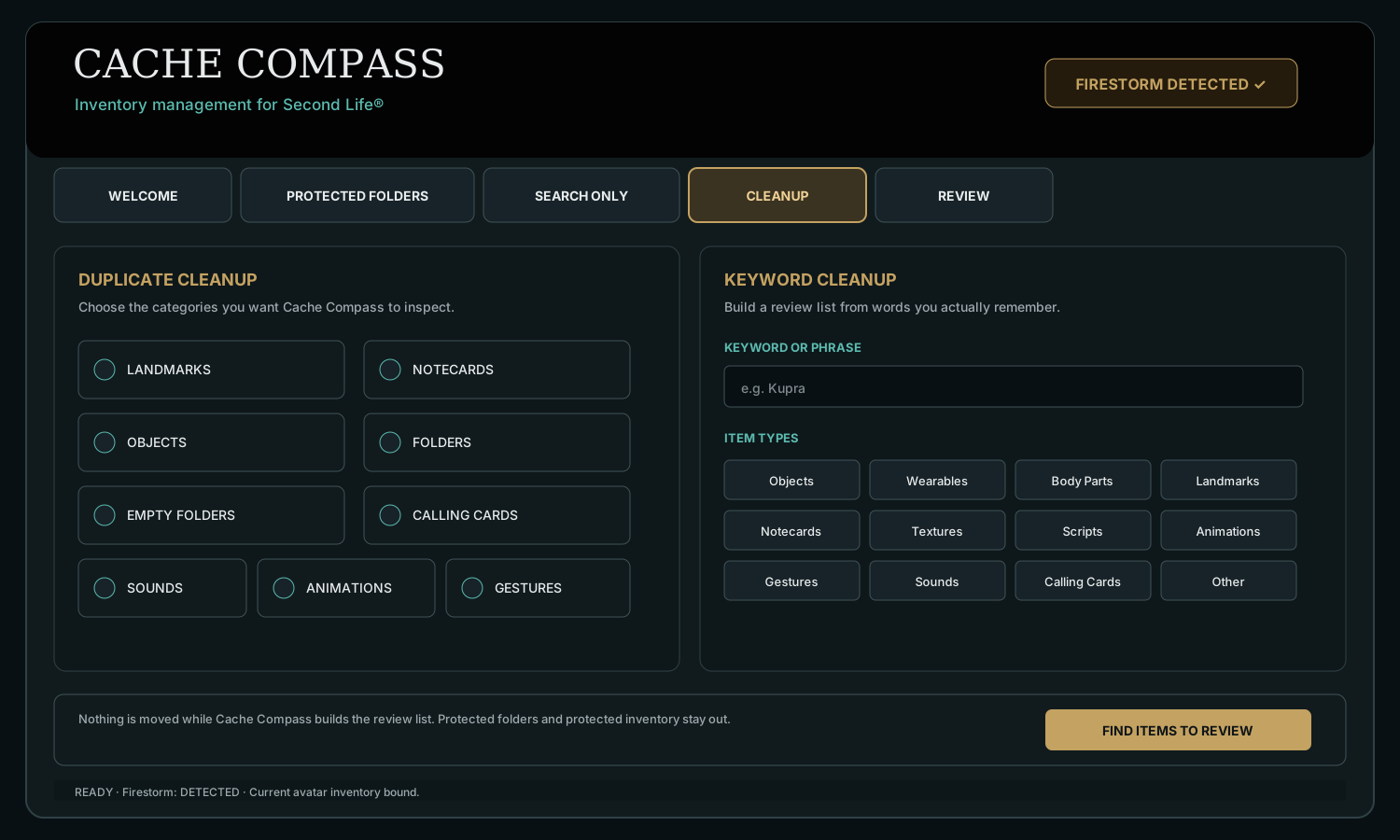
Landmarks. Notecards. Demos. Old body sizes. Empty folders. Duplicate copies. Tell Cache Compass what kind of clutter you’re looking for and it builds the review list for you.
Nothing moves until you review it. You decide what goes.
REVIEW & MOVE
You choose what goes. Cache Compass moves it to Trash.
Review the matches and select what you want removed. Cache Compass moves those items to your Second Life Trash.
Nothing is permanently deleted by Cache Compass. Empty Trash in-world when you’re ready.
A dead end for inventory clutter.
HOW IT WORKS
Firestorm stays open. Cache Compass stays in its lane.
Log in with Firestorm
Open Firestorm, log into Second Life, open Inventory and let it finish loading. Keep Firestorm open while you use Cache Compass.
Start Here
Cache Compass detects the supported Firestorm session and binds to the personal inventory of the avatar currently signed in.
Search and review
Search Only stays read-only. Cleanup can surface duplicate candidates, empty folders or keyword matches. Review the results and check only the items you want moved; for duplicate sets, one keeper has already been reserved.
Move Files
Keep Cache Compass open and leave Firestorm in the background. Cache Compass targets approved inventory UUIDs through Firestorm’s local window channel and moves those approved items.
Check Trash in Firestorm
Moved items go to Second Life Trash for another review. Cache Compass never empties Trash, so the final permanent-delete decision stays with you.
Go shopping
You did the hard part. Your inventory’s lighter, your clutter is handled, and you might even notice a little less lag. Now you’ve got room for new memories, new finds, and the creators who make Second Life fun.
THE INTERVIEW QUESTION
So, what are your weaknesses?
We’re not winning any races to the Trash folder.
Cache Compass can find the junk fast. Moving a giant batch is another story. Firestorm and Second Life have opinions about how quickly inventory should move, and we’d rather be annoyingly careful than excitingly destructive. Years of inventory clog aren’t disappearing in sixty seconds. But we’re still a hell of a lot faster than opening those folders one by one.
Firestorm becomes a no-touch zone.
While Cache Compass is moving files, Firestorm needs to stay open in the background and you need to resist the urge to fiddle with inventory, switch avatars, reorganize folders or generally “help.” We’ve built it so that if you touch Firestorm while we’re working, Cache Compass stops the move. Better to make you restart than let competing inventory activity turn into an expensive little disaster.
We only date Firestorm.
Other viewers seem lovely. We wish them well. But we’re a one-viewer kind of inventory management program. Firestorm is our girl. Cache Compass is compatible with Firestorm only.
Just like your mom, we’re gonna make you take the trash out.
Cache Compass moves what you approved into Second Life Trash. You are responsible for checking it before you empty it. Once you permanently delete inventory from Trash, that decision is yours, not ours. Protect the important stuff, double-check your Trash and maybe don’t prematurely ej-trash-ulate years of inventory before you’re sure.
LOCAL BY DESIGN
Your SL password is Firestorm’s business. Not ours.
Cache Compass does not require or read your Second Life password. Firestorm remains the software authenticated to Second Life.
Cache Compass reads a temporary, read-only snapshot of Firestorm’s local inventory data for search and review. It does not write to Firestorm’s cache or settings, and approved moves target only the inventory you selected.
PRICING
We know you alt. We don’t judge.
System requirements: Windows 10 or 11 and a supported Firestorm Viewer installation.
No SL password. You review what moves. Cache Compass never empties your Trash.
Third-party compatibility: Cache Compass depends on functionality provided by Firestorm, Second Life, Windows, and other third-party systems. Future changes to those platforms may affect or permanently prevent compatibility. A one-time purchase means no recurring subscription fee. It does not guarantee lifetime compatibility, support, updates, downloads, or operation for any minimum period. See the Terms and Refund Policy for details.
1 AVATAR · WEBSITE ONLY
Cache Compass
$24.99
One-time purchase · No subscription
Buy With USDUP TO 3 AVATARS
Cache Compass
$29.99
One-time purchase · No subscription
Buy With USDUP TO 5 AVATARS
Cache Compass
$34.99
One-time purchase · No subscription
Buy With USDUP TO 10 AVATARS
Cache Compass
$64.99
One-time purchase · No subscription
Buy With USDEvery tier includes the complete Cache Compass feature set. The only difference is the number of avatars on the license.
PREFER LINDEN DOLLARS?
Buy Cache Compass on Marketplace with L$.
Choose your license in our official Second Life Marketplace store. Download and setup instructions are included with your purchase.
3 Avatars
L$7,500
One-time purchase · No subscription
5 Avatars
L$10,500
One-time purchase · No subscription
10 Avatars
L$19,500
One-time purchase · No subscription
Digital software purchases are generally final after delivery or activation. See the Refund Policy for exceptions and applicable consumer rights.
FAQ
The questions we’d ask before letting anything near our inventory.
Does Cache Compass need my Second Life password?
No. Cache Compass does not require or read your Second Life password. You log into Second Life through Firestorm as usual.
Does Firestorm need to stay open?
Yes. Open Firestorm, let Inventory finish loading and keep Firestorm open while using Cache Compass. During Move Files, leave Firestorm in the background and keep the Cache Compass window open until the move finishes.
What happens to duplicate sets?
Cache Compass reserves one keeper from each duplicate set before the extras reach Review. Review shows the extra candidates and you decide which of those should move.
What inventory does Cache Compass protect?
The current safeguards include no-copy inventory, inventory links, Current Outfit references, Trash, Marketplace folders, protected system folders and folders you add to Protected Folders.
Can I use it on an alt?
Yes. Cache Compass works with whichever avatar is currently logged into Firestorm. To use another avatar, switch accounts in Firestorm first, then open Cache Compass. Your Cache Compass license covers 1, 3, 5 or 10 registered avatars depending on the tier you purchase. Cache Compass never asks for or stores your Second Life password.
Is Cache Compass a subscription?
No. Cache Compass is a one-time purchase, not a subscription. You pay once for the license tier you choose and there are no monthly or recurring subscription fees. Optional future upgrades or additional avatar capacity, if offered, would be separate purchases.
Is Cache Compass affiliated with Linden Lab or Firestorm?
No. Cache Compass is an independent third-party companion utility and is not affiliated with or endorsed by Linden Lab or the Firestorm Viewer project.
CONTACT CACHE COMPASS
Questions, bugs or really good suggestions?
Please DO NOT drop us a notecard in world ;)